How To See The Lightroom Settings and Fujifilm Recipes Behind Any Photo

Have you ever found yourself staring at a beautiful photo and wondering exactly how the photographer achieved that specific look? Maybe the greens have a perfect moody tint or the skin tones look incredibly natural and soft. You can spend hours moving sliders around in Lightroom trying to match it, but sometimes it feels like you are just guessing in the dark.
The good news is that you don't actually have to guess. Most of the time, the 'recipe' for that edit - whether it's complex Lightroom sliders or a specific Fujifilm film simulation - is hidden right inside the image file itself. We wanted to make that information accessible to everyone, so we built a tool called RECIPEEK to help you unbake the cake and see the ingredients.
What is RECIPEEK?
RECIPEEK is a simple web tool we created to find Lightroom Presets and Fujifilm Recipes from our favorite photos. It allows you to upload a photo and instantly see the in-camera or post processing settings used to create the look!
If the photo was edited in Lightroom, it gives you the exact preset that you can download.
If it was shot on a Fujifilm Camera, it pulls up the specific recipe so you can copy it to your camera.
It will also tell you which camera and lens a photo was shot on!
New Update: Calling all Fujifilm shooters!
RECIPEEK now speaks fluent Fuji.
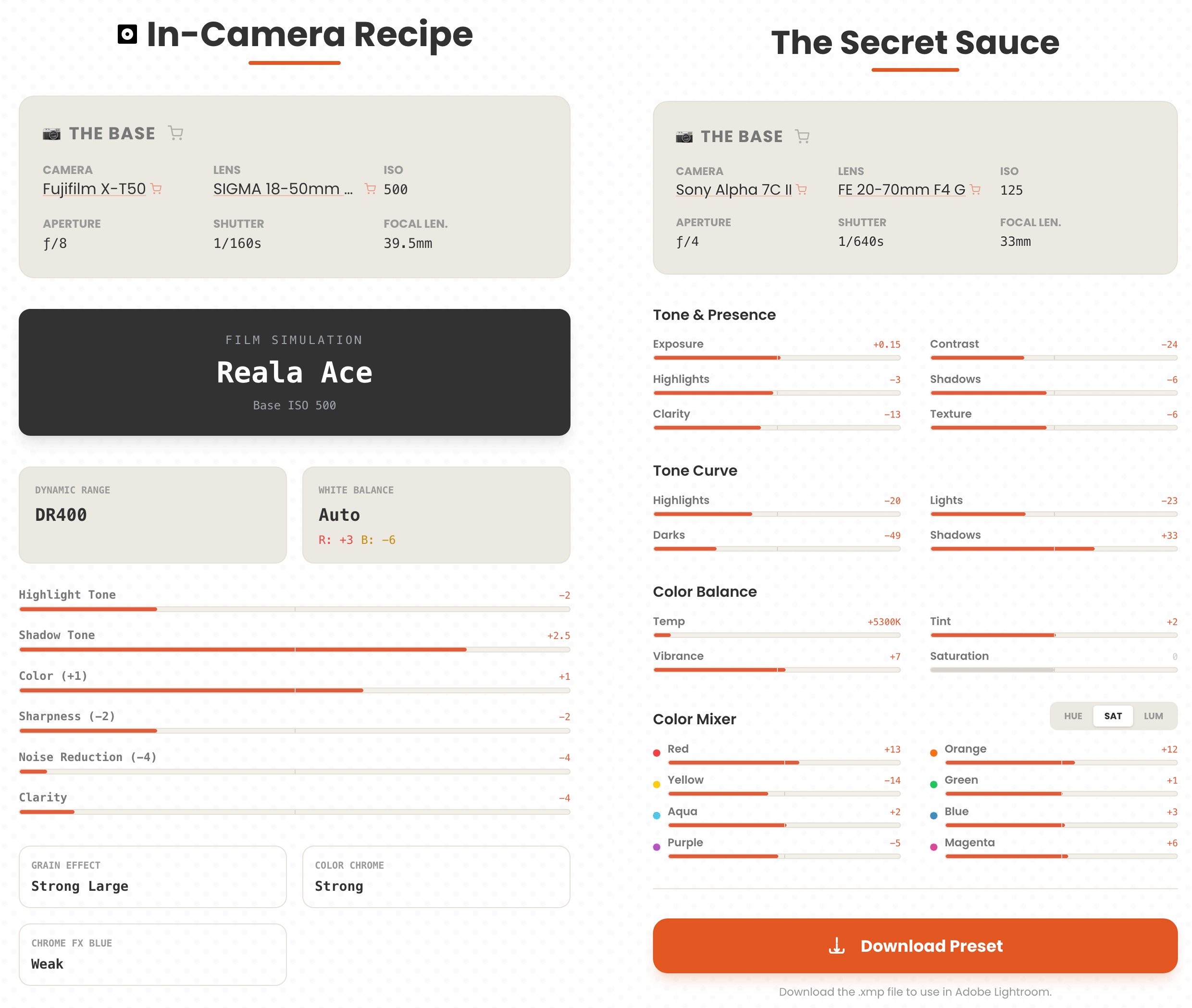
If you upload a JPEG straight from a Fujifilm camera, we don’t just show you generic settings - we extract the full Film Recipe.
This includes the Film Simulation (Classic Chrome, Acros, etc.), Dynamic Range settings, White Balance shifts (Red/Blue), Grain, and Color Chrome effects. It’s like having x-ray vision for SOOC (Straight Out Of Camera) JPEGs

Try it for yourself!
The image to the right (cowboy kids) is ready for RECIPEEK.
Right click the image and save it to your computer
Go to www.recipeek.studio
Drag and drop the image from your computer into the RECIPEEK app
Enter your email to get the recipe
Download the Lightroom Preset! Yay free preset for you.
*unfortunately squarespace strips the camera information, but lens information is available
Why we decided to share this
Mostly because we created it for ourselves - then got super nerdy with it and figured… we should probably share this! Originally I was using it as a way to extract my own film recipes and presets, and realized this could be super useful for people.
Our hope is that RECIPEEK becomes a helpful resource for you to learn, experiment, and ultimately find your own unique editing style.
Also, if you want the blunt truth - we can make a tiny bit of money on affiliate links if you end up clicking on them, so there’s that too.
You can try it out right now at www.recipeek.studio


Frequently Asked Questions
Does this work on every photo?
It works on most photos that were exported directly from Lightroom or Photoshop or directly from a Fujifilm Camera. A lot of photos on squarespace and other websites will work. If a photographer chooses to "strip metadata" during the export process, the information won't be there to find.
Can I use this to recover my own lost presets?
Absolutely. This is actually one of the most common ways people use the tool. If you edited a photo a year ago and forgot to save the preset, you can just upload that old JPEG to RECIPEEK and get your settings back in seconds.
Does this work for Fujifilm Film Simulations?
Yes! If the photo is a JPEG that came straight out of a Fujifilm camera (or hasn't been stripped of metadata), RECIPEEK will display a dedicated "Recipe Card" showing the exact in-camera settings used. It’s perfect for remembering that one random recipe you dialed in three months ago but forgot to write down.
How much does it cost?
The tool is free to use for anyone who wants to see their settings. The app features affiliate links that may earn us a commission, but its free to get recipes and presets with the app.
“Why doesn’t this work on Cody and Victoria photos? “
I knew someone would ask this haha! The short answer is it doesn’t work on my photos because I usually don’t edit in Lightroom. If you browse my website you’ll also see my Sony Film Recipes which are mainly what I use to shoot. (Since Sony doesn't save recipe data like Fuji does, you can't extract it with this tool - you have to grab the pack from our shop!)
These days if I do edit, I’m doing it on a mobile application which obviously won’t have Lightroom settings. This is for people who haven’t fully converted to the jpeg workflow yet and still want to edit RAW photos. Or those who are in the Fuji ecosystem.